

Starting a new website from scratch takes far longer than starting from a well-built template. A good Webflow template gives you a professional layout, working interactions, and a CMS structure already in place, so you can focus on your content and brand instead of rebuilding the basics.
Here are 10 of the best Webflow templates worth starting from, covering agency sites, portfolios, ecommerce, and niche use cases:
1. Analogue

Analogue is a modern marketing website template for any studio or agency that wants to showcase their design work. It makes it easy to show off beautiful client work, and is simple to add pages or change content.
Learn more and preview the template here
2. NFT Drop

If you sell digital art, collectibles, or any crypto-linked product, this template gives you a clean storefront-style layout built for showcasing individual pieces.
This Webflow template is a simple template for artists looking to sell or release digital collectibles and digital art, suitable for anyone selling digital assets using crypto on a platform such as OpenSea.
Learn more and preview the template here
3. Verse

Leveraging the power of Webflow Ecommerce, Verse is the simple way to start a small online store with an emphasis on brands, collections and quality - complete with integrated blog for further customer engagement.
Out of all the ecommerce templates available, this is one of the ones that shines above the rest. If you need an example of what an elegant website looks like, this template is the perfect example.
Learn more and preview the template here
4. Carded

Carded is a modern tech Webflow Template for banks, fintech startups, credit card companies, and other financial businesses. It is designed to be both beautiful and easy to use and to adapt to your brand.
Learn more and preview the template here
5. Hailey

Hailey Webflow Template is a CMS-powered portfolio solution for photographers and other creatives who love minimal design. Choose from multiple layout options and create your unique website.
Learn more and preview the template here
Why start from a template instead of building from scratch?
Templates give you a tested layout, responsive breakpoints, and often a working CMS structure out of the box, so you're customizing proven design decisions instead of making every decision yourself from a blank canvas.
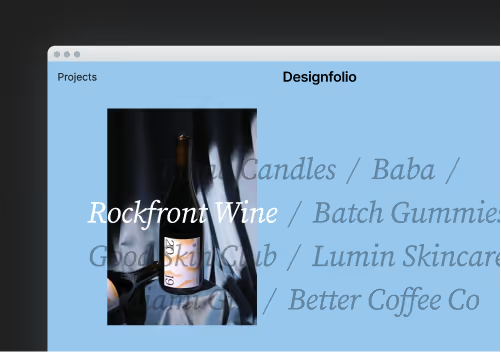
6. Designfolio

Designfolio is a modern portfolio website template for any agency, freelancer or designer that wants to showcase their design work. It makes it easy to show off beautiful client or personal projects, and is easily adaptable to fit your brand.
Learn more and preview the template here
7. Archie

Archie is a modern and elegant Webflow template for architecture studios. It comes with nice interactions and pixel-perfect layouts.
Learn more and preview the template here
8. Developfolio

Developfolio is a modern tech-focused portfolio template for any developer, freelancer or UX designer that wants to showcase their work and tell their personal story.
Learn more and preview the template here
9. Fidelity

Fidelity CMS is a Webflow Template that fits perfectly for Businesses who want a simple but clean website to showcase their Mobile App.
You can easily customize Fidelity CMS and be online even in matter of minutes! Create your own custom design using its multiple sections that you can arrange in any way you want.
Learn more and preview the template here
10. Typefolio

Sometimes all you need is a super simple website to showcase your work and say a little bit about yourself. Typefolio was created for this reason.
Typefolio is the minimal and lightweight Webflow website portfolio for any creative or designer who wants to showcase their work & projects. It has a great simple and modern look and works well for any creative or designer. It's responsive to all screen sizes and works great on all modern browsers.
Learn more and preview the template here
Those are 10 of the best Webflow templates that you can use to kickstart your new website this year. If you want to find more, you can go straight to the Webflow Templates homepage and browse through all the latest templates.
Frequently Asked Questions
How much do Webflow templates cost?
Most Webflow templates are one-time purchases, typically ranging from around $20-$150 depending on complexity, rather than a recurring subscription.
Can I customize a Webflow template after buying it?
Yes — buying a template gives you full edit access in the Webflow Designer, so you can change colors, fonts, layout, content, and CMS structure just as if you'd built it from scratch.
Do Webflow templates come with a CMS?
Many do, particularly ones designed for blogs, portfolios, or ecommerce — check the template's description for CMS-related features before buying if dynamic content is important to you.
Should I customize a template heavily, or use it close to the default?
Change enough that your site doesn't look identical to every other business using the same template — updating fonts, colors, imagery, and section order goes a long way without needing a full custom build.